LinkedIn Video Downloader
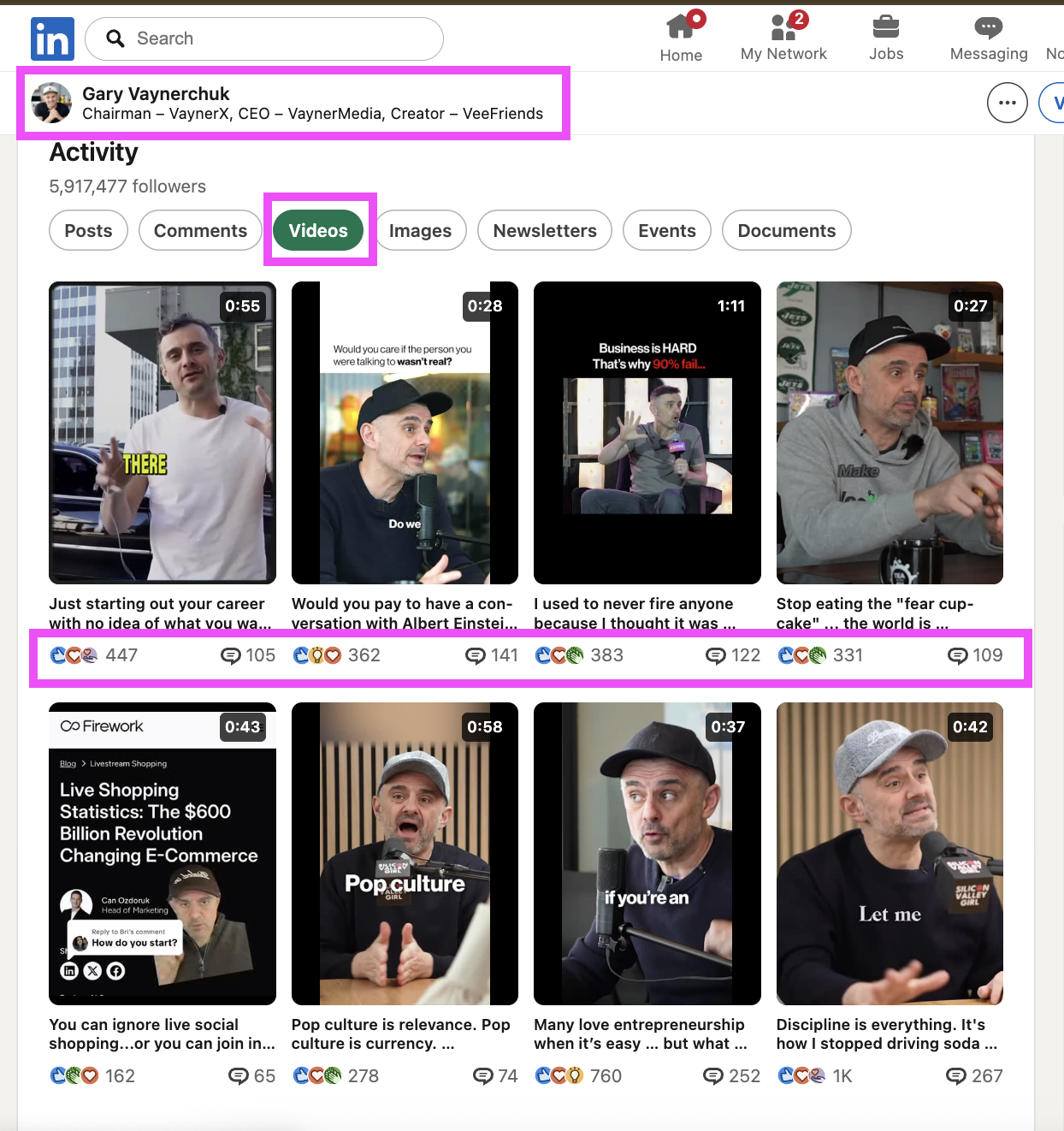
Using a reliable linkedin video downloader makes saving videos from posts fast, secure, and high-quality. The process works on desktop and mobile browsers, preserves original resolution when available, and prioritises user privacy by avoiding account access or third-party logins.
LinkedIn Video Downloader
Download Any Video in 3 Clicks
With just a few simple steps you can convert any public LinkedIn post into an MP4 file without watermarks or complicated software.
Copy the Post URL
First, locate the LinkedIn post that contains the video you want. Click the three-dot menu on the post and select "Copy link to post"
Add URL to Download Box
Next, paste the copied post URL into the designated URL input box on the downloader page. The tool will automatically validate the link and parse the video file information.
Download the Video
Click the download button. The linkedin video downloader will generate a direct download link so you can save the file to your device quickly.
How to Download Videos From Any Post URL
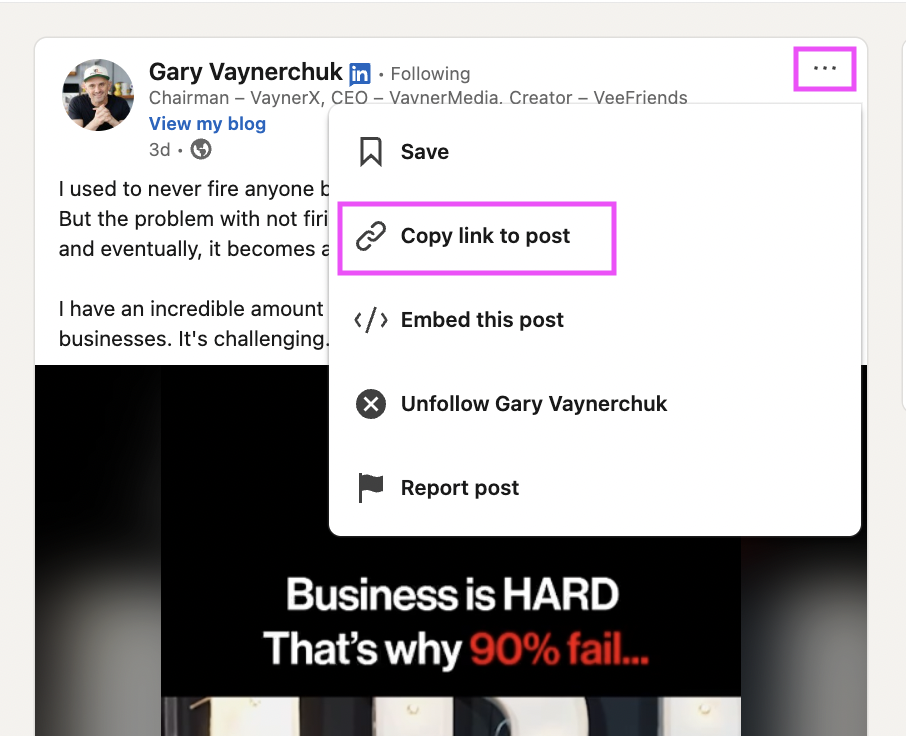
Copy the Post URL
First, locate the LinkedIn post that contains the video you want. Click the three-dot menu on the post and select "Copy link to post" or copy the URL from your browser address bar if you're on desktop. Make sure you copy the full post URL—this is the only input the linkedin video downloader needs to fetch the video source. If the post is private or behind a login, ensure you have permission to download the content.
Add URL to Download Box
Next, paste the copied post URL into the designated URL input box on the downloader page. The tool will automatically validate the link and parse the video file information, including available resolutions and formats. Using a secure online downloader means no software installation is required: simply paste the URL, choose the preferred quality (e.g., 720p, 1080p), and confirm.
Download the Video
After the URL is parsed, select the desired format—MP4 is recommended for wide compatibility—and click the download button. The linkedin video downloader will generate a direct download link so you can save the file to your device quickly. For large or high-resolution files, use a stable connection to avoid interruptions. Many tools also offer batch T or convert-to-audio options if you need multiple videos or an MP3 file. Always respect copyright and usage rights when saving and sharing downloaded content.
Why Use Our LinkedIn Video Downloader?
Completely Free
This video downloader is completely free and shows no hidden costs or hidden fees. You don’t need to login, install software or create an account: just copy the video link from the right corner of the post or top right corner where LinkedIn shows the share option, paste the link into the tool and start your download. The free online server processes videos fast, lets you save videos free in hd for free, and supports videos in hd with no watermark. Many LinkedIn videos get saved for personal use and offline viewing within seconds — typically from 3 seconds to 10 minutes depending on file size and network speed.
Fast & Reliable
Our downloader is optimized to download linkedin videos quickly and reliably. The backend server handles video downloads so you can get video content without delays or complex setup. The download button appears once you paste the url or video link, and the tool converts and saves videos to your device in hd quality. It works on all browsers and devices — desktop, tablet and smartphone — and supports videos for free, videos without watermark and videos for personal use. If you want to archive content or prepare reposting with added subtitles, the process is straightforward and seamless: copy link, paste the link, click download and the video will be stored locally.
Browser-Based
Being browser-based means the linkedin video downloader works without software installation, so you can navigate to the tool from any browser and device to download LinkedIn videos for free. The interface is intuitive: paste the post url or copy link to post from the right corner of the post, then click the download option to save hd videos. The service supports many linkedin videos and provides hd quality downloads for offline viewing. It also integrates helpful prompts and a call to action to always credit the original creator when reposting. If you need videos quickly for viewing, archiving or adding subtitles, this free online downloader lets you copy the video url and get videos free in just a few clicks, with no registration and no hidden fees.
Free LinkedIn Video Downloader — Download LinkedIn Videos for Free with GrowReach
Why LinkedIn Videos Are a Game-Changer
LinkedIn video content has become essential for creators and brands who want to increase engagement and build authority. Videos help posts stand out in feeds, boost watch time, and encourage reposting and comments, while short-form clips and long-form interviews both serve different audience needs. Whether you want to download videos for offline viewing or save linkedin moments for repurposing, having a fast video downloader makes it seamless to archive or share content across platforms.
The Power of LinkedIn Videos
LinkedIn videos allow creators to tell stories, demonstrate expertise, and convert viewers into followers or customers with a clear call to action. Many linkedin videos perform better because they combine visuals, captions, and context that resonate with professional audiences; adding subtitles or editing downloaded clips ensures they work for silent autoplay and mobile viewing. A free LinkedIn video downloader that works on all devices, including smartphones and tablets, lets you save hd copies and store any videos for personal use, always remembering to credit the original creator when reposting.
4 Hacks to Make Your LinkedIn Videos Perform Better
1) Start strong: hook viewers in the first 3 seconds to 10 minutes of content to improve retention. 2) Add subtitles and captions so videos are accessible during desktop or mobile viewing and increase watch time on smartphones. 3) Repurpose clips: download linkedin videos for free, trim and repost as short-form highlights to reach more viewers. 4) Use HD footage and optimize your post: save hd quality files from our free online tool, remove watermarks when you have permission, and always credit the creator to avoid issues with attribution.
Why You Should Start Posting Videos on LinkedIn
Posting videos on LinkedIn helps you build credibility, grow your network, and showcase insights that static posts can’t convey. If you want to download any linkedin video for review or to create compilations, a reliable linkedin video downloader allows you to copy the video url or copy link to post, paste the link into the tool’s box, and click download to get videos in hd without software installation or hidden fees. Our free linkedin video downloader is completely free, requires no registration or login, works across desktop, tablet, and smartphone, and lets you save videos quickly for offline viewing or to reuse in marketing campaigns while always crediting the original creator.
Explore More Free Tools
Check out our collection of free LinkedIn tools designed to boost your growth.
Save time on everyday tasks with simple, powerful tools.
Explore a growing collection of free tools designed to help you work faster, solve problems, and get more done without unnecessary complexity.
Frequently Asked Questions
Downloading videos from LinkedIn for personal use depends on the video's copyright and the creator's permissions. Our free online linkedin video downloader allows you to download videos in hd for offline viewing and to save linkedin content for educational or personal archiving, but you should always credit the original creator and respect LinkedIn's terms of service and local copyright law. If you plan to repost or repurpose video content, obtain permission from the creator and follow applicable licensing rules.
Private or restricted LinkedIn post videos are protected and our tool does not bypass access controls. The video downloader lets you download videos that are publicly available or that you have legitimate access to view. You cannot use the downloader to copy or save videos behind login walls or private groups unless you are authorized to view and download that content.
The downloader can often fetch multiple resolutions and lets you download hd quality when the original linkedin video is available in HD. You can choose to download video in hd or standard quality; the server delivers the best available stream so you can save hd for free when offered. HD downloads preserve clarity for viewing on desktop, tablet, or smartphone.
We do not permanently store videos you download. The service fetches the video URL, processes the download, and provides a link for you to download the file to your device. Temporary server cache may be used to facilitate video downloads, but videos are not kept in an archive for longer than necessary. This free linkedin video downloader aims to be hassle-free with no hidden fees or registration required.
If a video won't download, common reasons include a private post, an expired or invalid video url, or a changed post url. Make sure you copy link or copy link to post from the top right corner or right corner of the post, then paste the link into the downloader. Also check your internet connection and that the linkedin post is still available; sometimes videos take 3 seconds to 10 minutes to process or streaming protections prevent downloads.
Yes. The free linkedin video downloader works on all devices, including smartphones, tablets, and desktop browsers. The interface is seamless and lets you paste the link or video url directly from the LinkedIn app or mobile browser so you can save videos quickly for offline viewing or to store any videos for later use.
No installation or software installation is required. This free online tool is a browser-based video downloader that allows you to download linkedin videos without plugins, downloads, or registration. Just copy link to post or copy the video link, paste it into the field, click download, and the site processes the video for download.
Absolutely — the downloader is optimized for mobile and desktop. Whether you're using a smartphone, tablet, or desktop, the process is the same: copy the video link from the LinkedIn post, paste the video url into the downloader, and choose the download button to save hd or standard quality. It works seamlessly across devices, supports offline viewing, and helps you download linkedin videos for free with no hidden costs.